Top 10 Excel Add-ins
Excel Add-ins: Top 10 Add-ins to Enhance Your Productivity
Microsoft Excel is a powerhouse when it comes to managing data, performing calculations, and generating reports. But did you know that you can extend its capabilities even further? Excel add-ins are like power-ups for your Excel experience, offering additional features that can help streamline your work and boost productivity. Whether you’re dealing with complex data analysis or simple everyday tasks, there’s an add-in for you. In this article, we’ll dive into the top 10 Excel add-ins that can take your productivity to the next level.
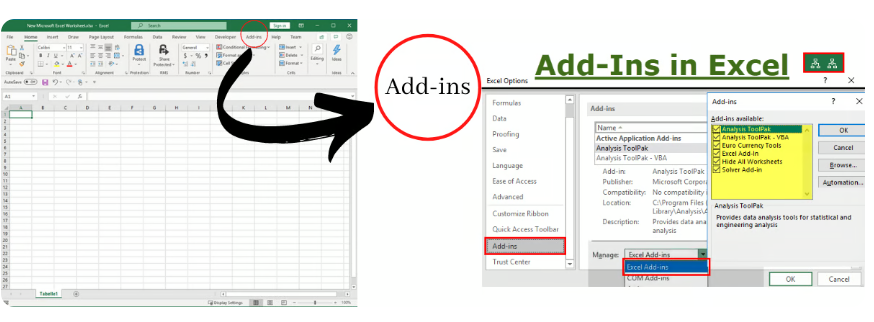
Excel Add-ins1. Add-ins-1 Power Query
Power Query is a robust tool for data transformation and data connection. It allows you to import data from various sources, clean it up, and shape it according to your needs. This add-in is particularly useful for those who work with large datasets from multiple sources.
Key Features:
- Data Import: Import data from web pages, databases, and more.
- Data Transformation: Clean and transform data without needing complex formulas.
- Automation: Automate data refreshing and transformations.
2. Power Pivot
If you’re dealing with large datasets and complex calculations, Power Pivot is your best friend. This add-in enables you to create data models, perform powerful data analysis, and create sophisticated data relationships.
Key Features:
- Data Models: Create relationships between different datasets.
- Advanced Calculations: Use DAX formulas for complex calculations.
- Large Data Handling: Work with millions of rows of data without slowing down Excel.
3. ASAP Utilities
ASAP Utilities is a comprehensive add-in that offers over 300 features to enhance your Excel experience. From simple tweaks to advanced tools, it covers a wide range of functionalities that can save you a lot of time.
Key Features:
- Data Cleaning: Quickly remove duplicates, trim spaces, and format cells.
- Navigation: Easily navigate through your workbooks with enhanced shortcuts.
- Automation: Automate repetitive tasks with custom macros.
4. Analysis ToolPak
For those who require advanced statistical analysis, the Analysis ToolPak is a must-have. This add-in provides a variety of data analysis tools, including regression analysis, histograms, and more.
Key Features:
- Statistical Analysis: Perform complex statistical analyses with ease.
- Data Visualization: Create histograms and other data visualizations.
- User-Friendly: Simple interface for quick and easy analysis.
5. Solver
The Solver add-in is perfect for optimization problems. It allows you to find the best solution for decision variables that meet certain constraints. This is particularly useful for financial modeling and operations research.
Key Features:
- Optimization: Solve linear and nonlinear problems.
- Constraint Handling: Define constraints to meet specific requirements.
- Scenario Analysis: Analyze different scenarios to find the optimal solution.
6. XLTools
XLTools offers a suite of tools designed to improve your productivity and streamline your workflow. From version control to advanced data validation, this add-in covers a wide range of functionalities.
Key Features:
- Version Control: Track changes and revert to previous versions.
- Data Validation: Advanced tools for data validation and cleansing.
- Macro Recording: Record and automate repetitive tasks.
7. Kutools for Excel
Kutools for Excel is a powerful add-in that provides more than 300 advanced features to simplify your work. It covers everything from basic operations to complex tasks, making it an essential tool for any Excel user.
Key Features:
- Range Management: Advanced tools for managing cell ranges.
- Workbook Management: Easily merge, split, and manage workbooks.
- Data Tools: Comprehensive data tools for sorting, filtering, and more.
8. Ultimate Suite for Excel
The Ultimate Suite for Excel by Ablebits is a collection of over 60 professional tools for daily tasks. Whether you need to merge data, remove duplicates, or clean your data, this suite has got you covered.
Key Features:
- Data Merging: Easily merge cells, rows, and columns.
- Duplicate Removal: Find and remove duplicates in a snap.
- Data Cleaning: Comprehensive tools for cleaning and formatting data.
9. Data Analysis Expressions (DAX)
DAX is a formula language for Power Pivot, Power BI, and other data analysis tools in Excel. It allows you to create powerful calculations and aggregations that go beyond standard Excel functions.
Key Features:
- Advanced Calculations: Perform complex calculations with ease.
- Data Aggregation: Aggregate data across multiple tables and relationships.
- Flexibility: Use in Power Pivot, Power BI, and other tools.
10. Excel Functions Translator
The Excel Functions Translator is a handy tool for those who work with Excel in multiple languages. It allows you to easily translate functions from one language to another, ensuring smooth collaboration and understanding.
Key Features:
- Function Translation: Translate Excel functions between languages.
- User-Friendly: Easy-to-use interface for quick translations.
- Collaboration: Improve collaboration with colleagues who use different language versions of Excel.
Conclusion
Excel add-ins can significantly enhance your productivity and streamline your workflow. Whether you’re dealing with data analysis, data cleaning, or complex calculations, there’s an add-in that can help. By leveraging the power of these top 10 Excel add-ins, you can make your Excel experience more efficient and effective. Start exploring these tools today and see how they can transform your work in Excel.
Incorporating these add-ins into your daily routine can save you time and effort, allowing you to focus on what truly matters: making data-driven decisions and achieving your goals. So, go ahead and give them a try—you might just find that they become indispensable parts of your Excel toolkit.